Social Icons

Pages

Sunday, September 25, 2011

iSCSI Boot from SAN on Cisco UCS

Last week Cisco released the new 2.0 code for Cisco UCS.  I had some time to play with the update and tried out the new iSCSI Boot from SAN support feature to see how it works.  Here are some of the steps I used to get a VMware ESXi 5.0 host up and running via iSCSI storage on UCS.

Service Profile and vNIC Configuration

1)      In the UCSM, create a Service Profile.  This profile will be created as usual(except for vHBAs) but make sure that you create 2 vNICs that will be reserved for iSCSI traffic.  UCS will use these vNICs as “Overlay NICs” that will provide the VLAN connectivity details for the iSCSI vNICs in the Service Profile.
2)      Configure the VLANs on the Overlay vNICs by selecting the vNIC and clicking the Modify VLANs link in the working pane. 
3)      In the Modify VLANs window, Select your VLAN for iSCSI and select the “Native VLAN” radial button for the VLAN.  Making this the native VLAN for the Overlay vNICs will pass the frames for the iSCSI VLAN untagged and ease the configuration and installation of the OS.  Click OK, and then click the Save Changes button in the working pane for the vNIC.  Repeat these steps for the 2nd vNIC that will be used as an Overlay vNIC for iSCSI.

Tuesday, January 25, 2011

Activating UCS System and Fabric Interconnect Firmware from CLI

Activating UCS System and Fabric Interconnect Firmware from CLI

I recently had to update the firmware on 2 UCS 6120XPs FIs that were on different firmware versions at the UCS Manager(USCM, also called system) level of the interconnects.  

My first step was to erase the configs on each interconnect and setup was rerun to configure the FIs in "stand-alone" mode.  Also the firmware packages were already loaded to the servers via the GUI(Please refer to the CLI documentation for steps on erasing the configuration and uploading firmware images).  To update the firmware via the CLI I used the following steps:

Friday, January 7, 2011

Direct Attached FC Storage with UCS

Cisco has released the new code release (1.4.1j). I had the chance of setting up one of the newest features included in this code release which is configuring direct attached storage from an EMC storage array directly to UCS 6120XP fabric interconnects. The process was not that difficult but there were some configurations that had to be played with to make this work properly for Boot from SAN connectivity that I have not dealt with for previous configurations with Storage connected via a fabric switch. Here are the steps we used to make this work:

UCS configuration:
  1. Connect the FC storage to the FC expansion modules on the UCS 6120xp
  2. In the UCS Manager, select a interconnect and in the general tab in the right pane select “Set FC Switching Mode”. Note: This will cause the Fabric Interconnects to reboot.
  3. Once the UCS Manager is back online, select one of the Fabric Interconnects, then on the General tab in the right window, right click the desired FC ports of FC Expansion module and select “Configure as FC Storage Port” in the drop down
  4. On the default VSAN, select “Enable Default Zoning. This allows the 6100 to communicate with the storage and vice versa for sharing the WWPN of devices.
  5. Next, configure the boot policy for the host.

Thursday, January 22, 2009

Travel Gear


Before I left for Japan, I wanted to be sure I could take my gadgets with me while I was on the road, but more importantly, I didn't want to lug around any bulky items.

With this in mind, I went shopping online and in stores about a month or so before my trip to find 

1) Netbook , and 
2) a back pack to keep the netbook and other items in that would fit underneath an airplane seat.

Tuesday, December 23, 2008

Miyajima


After resting up at the Benten no Yado Itsukushima, we were ready to take a tour of the island.
Here are a few shot taken as we make our way one shopping area leading to Itsukushima Shrine.

Benten no Yado Itsukushima - Miyajima

I'm dedicating this post to the Benten no Yado Itsukushima, the hotel that we had the please of residing for our one night stay in Miyajima. I stayed at a few hotels (or Ryokan), but this was the most memorable.


Saturday, December 20, 2008

Hiroshima

I have always had an interest in WWII and the conflicts that took place during the war, so I was glad to be taking my first trip to one of the most history conflicts of the Asian front of the war, Hiroshima.
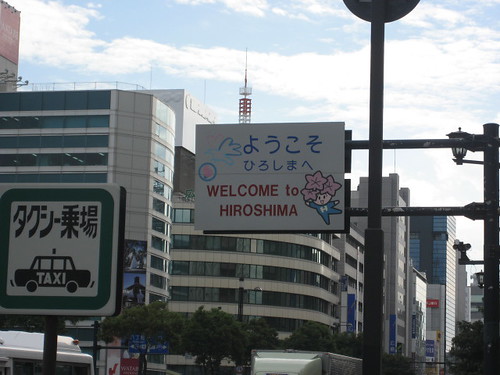
Honestly I didn't come across this sign until we were about to leave the city, but it has to go first.